


Short Explanation
A subdirectory is basically a folder within your main website. You’ve probably seen them before, something like example.com/blog or example.com/store. These are subdirectory. They live under your primary domain and help you organize different parts of your site without splitting it into separate sections or entities.
Unlike subdomains, which sit outside the main domain structure (blog.example.com, for example), subdirectory keeps everything under one roof.
This setup often makes it easier for search engines to understand your site’s hierarchy, and in many cases, it helps your content benefit from the authority of the main domain, which can be good for SEO.
If you’re managing a blog, product catalog, help center, or anything that supports your main site’s purpose, using a subdirectory can be a smart move. They help keep things centralized and straightforward.
But don’t just assume subdirectory is always the best option. Like most things in web strategy, it depends on your goals.
In this article, we’ll walk through what subdirectory really are, how they work, and when you should use them. By the end, you’ll be better equipped to make smart decisions for your site’s structure and avoid costly mistakes.
What is a Subdirectory?
To put it simply, subdirectory is a way to organize content within a single domain. When you create a page like yourwebsite.com/services or yourwebsite.com/blog, you’re using a subdirectory to store and display that section of content.
Everything stays under your root domain, which means your content shares the same technical and SEO environment, same analytics, same server, and same domain authority.
From a user’s perspective, subdirectory helps keep the site structured and easy to navigate. Visitors can quickly tell where they are and how to move around. But beyond just the user interface, subdirectory also plays a role in how search engines crawl and index your site.
Search engines treat subdirectory as part of the same site. That means when your homepage gains authority through backlinks or traffic, your subdirectory may also benefit. It’s a clean, centralized approach that works well for businesses and creators who want to build SEO strength in one place.
This is why many people choose subdirectory when launching a blog, knowledge base, landing pages, or product collections under the same brand. It’s easy to manage and keeps your domain’s value focused in one spot instead of splitting it up.
How does subdirectory Work?
On the technical side, subdirectory are just folders inside your main website’s root directory. For example, if you’re running a WordPress site, you might have a folder like /blog/ or /portfolio/ within your site’s file structure. The server knows to pull content from those folders when someone visits that URL.
When it comes to content management systems (CMS) like WordPress, Joomla, or Drupal, most of the setup is handled automatically. You don’t have to manually create folders unless you’re working on a custom-built site.
The CMS routes URLs and manages your content based on how you configure your settings and permalinks.
For static or hand-coded websites, you (or your developer) may need to manually create those folders and drop HTML or PHP files inside. Either way, your server maps URLs to these folders so users see the right content when they click a link.
The whole process is fairly seamless, and that’s one of the reasons subdirectory remains a popular and practical choice, especially for growing websites that need to stay organized.
Subdirectory vs. Subdomain – Comparison Table
This is a brief comparison table of both of them
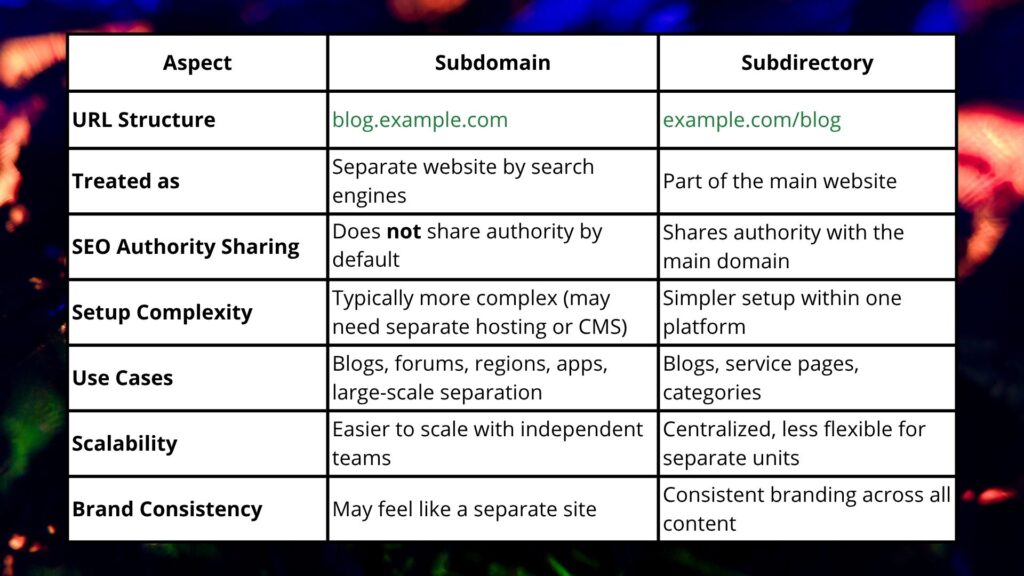
SEO Implications of Using Subdirectories
Using subdirectories can be a smart move if you’re aiming to build a strong, centralized SEO strategy. Since subdirectories are considered part of your main domain, any backlinks, content updates, or traffic you get across your site can help strengthen the overall domain authority.
That means your blog at example.com/blog or your resources at example.com/guides all contribute to — and benefit from — your domain’s SEO performance as a whole.
This setup can also help search engines crawl your site more efficiently. Because everything is under one structure, Google can easily understand how your content is related. That makes it easier to rank for broader keyword groups and build topical authority over time.
You’ll also get more straightforward data in tools like Google Search Console. With subdirectories, your impressions, clicks, and keywords are all tracked under a single property. No need to connect and monitor separate profiles for each section.
In short, if your goal is to grow one brand or domain, subdirectories give you SEO efficiency and simplicity. For most small to mid-sized websites, that’s a clear advantage, especially when content is closely related.
When to Use a Subdirectory
Subdirectories are a great choice when you want to keep everything under one brand, one site, and one SEO strategy. If your content is closely related, like a blog, help center, landing pages, or product categories, then a subdirectory makes sense. It allows you to build authority in one place without spreading your efforts thin.
For example, if you’re running a company website and want to launch a blog, placing it at yourdomain.com/blog helps the blog benefit from the authority your main site has already built. The same goes for guides, customer resources, or even regional landing pages.
Subdirectories are also easier to manage when working with one CMS and one analytics setup. You don’t have to maintain separate dashboards or deal with cross-domain tracking.
In short, choose a subdirectory when your content supports your core offering, and you want SEO efforts to benefit the whole site. It’s especially useful for small to medium businesses that don’t need to isolate content into different web properties.
Conclusion
Subdirectories are a practical and powerful way to structure your website, especially when your content is all part of the same brand or purpose. They keep everything under one domain, making it easier to manage, easier to track, and more effective from an SEO standpoint.
If you’re building out a blog, resource center, or additional pages that support your main business, subdirectories help consolidate your authority and simplify growth. You avoid the hassle of splitting analytics or fighting to rank on multiple fronts.
The key is understanding when and why to use them. With the right structure in place, you set your site up for long-term clarity and performance.
Still unsure if a subdirectory is the best fit? Compare it side by side with subdomains in our detailed breakdown: subdomain vs subdirectory