
What you’ll learn in this guide:
- The difference between on-page, off-page, and technical SEO
- Which on-page factors have the most impact on your rankings
- How to optimise each element on your pages, step by step
- How long on-page SEO typically takes to show results
- When it makes sense to do it yourself versus hiring someone
What Is On-Page SEO?
On-page SEO refers to every optimization you make directly on your own website pages. That includes your content, your HTML elements, and your page structure. Everything within your control.
It is the foundation of how search engines understand what your page is about. Without it, even a well-designed website struggles to appear in search results for the right queries.
The term covers a wide range of elements. Title tags, heading structure, keyword placement, internal links, image alt text, and URL structure all fall under on-page SEO. Each one sends signals to Google about your page’s topic, relevance, and quality.
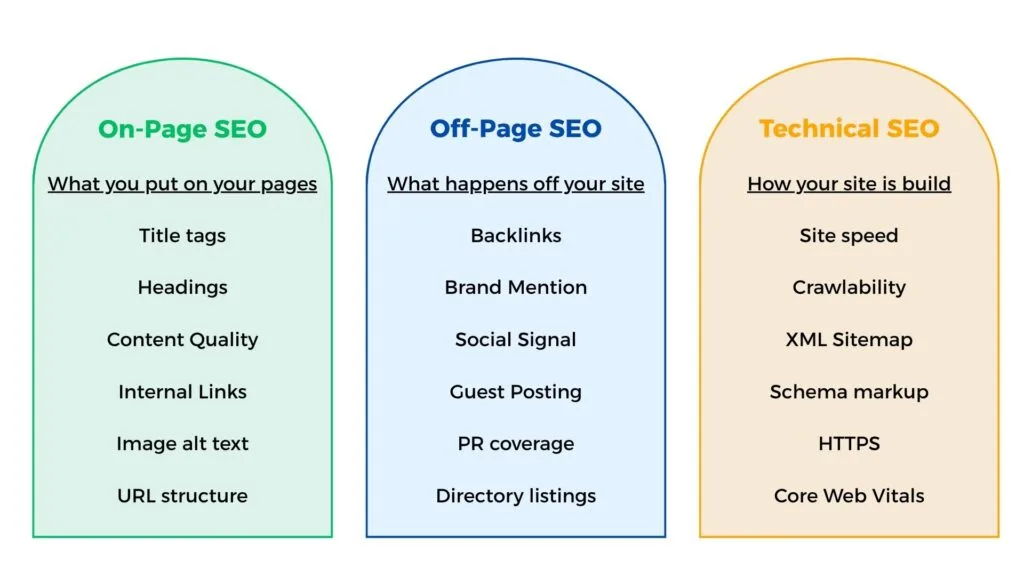
Now here is a quick visual to clarify the three types of SEO before we go further.
On-Page vs Off-Page vs Technical SEO
These three terms are often used interchangeably, but they refer to different things.
On-page SEO covers everything you do directly on your pages such as content, title tags, headings, internal links, and URL structure. Off-page SEO refers to actions taken outside your website, mainly building backlinks and brand mentions. Technical SEO is about how your site is built, factors to consider are site speed, crawlability, XML sitemaps, and Core Web Vitals.
All three matter for rankings. But on-page SEO is where most small business websites have the most room to improve, and every element is within your direct control from day one.
Is On-Page SEO Still Worth It in 2026?
The short answer is yes, but the way it works has shifted.
Google’s introduction of AI Overviews has changed how some searches look. According to a December 2025 study by Ahrefs, the presence of an AI Overview correlates with a 58% lower average clickthrough rate for the top-ranking page. That is a significant drop for high-visibility keywords.
But that is not an argument against on-page SEO. It is an argument for doing it better.
AI Overviews, featured snippets, and AI chatbot citations all pull from the same source: well-structured, credible web content. If your pages are not optimised, they will not appear in traditional search results and they will not be cited by AI systems either.
On-page SEO is the foundation that makes both possible.
Google has also been clear about what it values. John Mueller, Google’s Search Advocate, has consistently emphasised that on-page SEO comes down to content on how well your page answers the question a user is actually asking.
For small business owners, this means one thing: a page that is clearly written, properly structured, and genuinely useful still has a strong place in search in 2026.
The Most Important On-Page SEO Factors
Not all on-page elements carry equal weight. Some directly influence whether Google ranks your page. Others support the overall quality of your site. The factors below are the ones worth prioritising first.
Each one links to a dedicated article where the topic is covered in full detail.
Title Tags and H1
Your title tag is the headline that appears in Google search results. It tells both users and search engines what your page is about. A well-written title tag that includes your target keyword can improve your clickthrough rate significantly.
Your H1 is the main heading visible on the page itself. There should only be one H1 per page, and it should reflect the same topic as your title tag—though it does not need to be identical.
For a full guide on writing title tags and heading structure, see: Title Tags and Heading Structure.
Meta Descriptions and URL Structure
Your meta description is the short summary that appears beneath your title in search results. It is not a direct ranking factor, but it influences whether someone clicks your result over a competitor’s.
Your URL should be short, readable, and include your target keyword. Avoid random strings of numbers or symbols. A clean URL like /on-page-seo-guide communicates the topic instantly to both users and search engines.
For a full guide, see: Meta Descriptions, Title Tags, and URL Slugs.
Keyword Placement and Supporting Keywords
Your primary keyword should appear naturally within the first 100 words of your content, in your title tag, and in at least one H2 heading. Beyond that, use it where it fits, do not force it it.
Supporting keywords are related terms that reinforce the topic of your page. They help Google understand the full context of your content without requiring you to repeat the same phrase repeatedly.
For a full guide, see: Keyword Placement Strategy.
Content Quality and Search Intent
Google ranks pages that best answer what the user is actually looking for. This is called search intent, the underlying goal behind a search query. A page optimised for the right keyword but written for the wrong intent will consistently underperform.
Content quality means covering the topic thoroughly, using accurate information, and writing in a way that is easy to read. It does not mean writing the longest article possible.
For a full guide, see: Content Optimisation and Search Intent.
Internal Linking and Anchor Text
Internal links connect your pages to each other. They help Google discover your content, understand the relationship between pages, and distribute authority across your site.
Anchor text — the clickable words in a link — should describe the destination page accurately. Avoid generic phrases like “click here.” Use descriptive text that gives both users and search engines context.
For a full guide, see: Internal Linking Strategy.
Image Optimisation
Large, uncompressed images slow your page down. Every image on your site should be compressed, saved in a modern format like WebP where possible, and given a descriptive file name.
Alt text is the written description attached to each image. It helps search engines understand what the image shows, and it supports accessibility for users who rely on screen readers.
For a full guide, see: Image Optimisation for SEO.
External Links
Linking out to credible, relevant sources shows Google that your content is well-researched. It also adds value for your readers by pointing them to useful references.
Not every link needs to be a dofollow link. Sponsored content and user-generated content should use nofollow attributes. For standard editorial links to reputable sources, dofollow is appropriate.
For a full guide, see: External Links in SEO.
Page Speed and Core Web Vitals
Page speed is both a ranking factor and a user experience factor. Google measures this through Core Web Vitals, a set of metrics that assess how quickly your page loads, how stable the layout is, and how fast it responds to user input.
Slow pages lose visitors before they even read a word. Use Google PageSpeed Insights to identify what is slowing your site down and address the highest-impact issues first.
Schema Markup
Schema markup is structured data added to your page’s HTML. It helps search engines understand the meaning behind your content, not just the words, but what they represent.
Implementing schema can enable rich results in Google search, such as FAQ dropdowns, star ratings, and event details. These improve visibility and clickthrough rates without directly affecting rankings.
How to Do On-Page SEO Step by Step
On-page SEO does not have to be complicated. The steps below follow a logical order. You can start here every time you create or update a page.
Step 1: Research your target keyword and search intent
Before you write a single word, identify the primary keyword you want the page to rank for. Then check what Google already shows for that keyword, look at the top five results and note the format, length, and angle of the content.
That tells you what search intent Google has assigned to the query. Match your content to that intent, not just to the keyword.
Step 2: Optimise your title tag and meta description
Write your title tag first. Keep it under 60 characters, include your primary keyword, and make it specific enough to stand out in search results.
Your meta description should summarise the page in one to two sentences. Aim for 130–150 characters. It will not directly improve your ranking, but a well-written description improves the likelihood that someone clicks your result.
Step 3: Structure your content with logical headings
Use one H1 that reflects the main topic of the page. Break the rest of your content into sections using H2 headings, with H3 subheadings where needed.
Your headings should follow a logical hierarchy. A reader scanning your headings alone should be able to understand what the page covers.
Step 4: Place keywords naturally throughout the content
Include your primary keyword within the first 100 words. Use it again in at least one H2 heading. Beyond that, write naturally because search engines are sophisticated enough to understand synonyms and related terms.
Avoid repeating the same keyword phrase in every paragraph. It reads unnaturally and signals keyword stuffing to Google.
Step 5: Add internal links to relevant pages
Every page you publish should link to at least two or three other relevant pages on your site. Use descriptive anchor text that tells the reader and Google what they will find on the linked page.
Also check your existing pages and add links pointing to your new page where relevant. Internal linking works in both directions.
Step 6: Optimise your images
Before uploading any image, compress it and save it in WebP format where your platform supports it. Giving the file a descriptive name like on-page-seo-checklist.webp is more useful than image001.webp.
Write alt text for every image. Keep it descriptive and concise. If the image contains text, include that text in the alt attribute.
Step 7: Check your URL structure
Your URL should be short, lowercase, and readable. Include your primary keyword and separate words with hyphens. Remove stop words like “and”, “the”, and “for” where they add length without adding clarity.
Once a URL is indexed, avoid changing it unless necessary. If you do change it, set up a 301 redirect from the old URL to the new one.
Step 8: Review for mobile readability
Open your page on a mobile device before publishing. Check that text is readable without zooming, buttons are easy to tap, and images scale correctly.
Google uses the mobile version of your page to determine rankings. A page that works well on desktop but poorly on mobile will underperform in search regardless of how well everything else is optimised.
How Long Does On-Page SEO Take to Work?
This is one of the most common questions small business owners ask and the honest answer is that it depends on a few key factors.
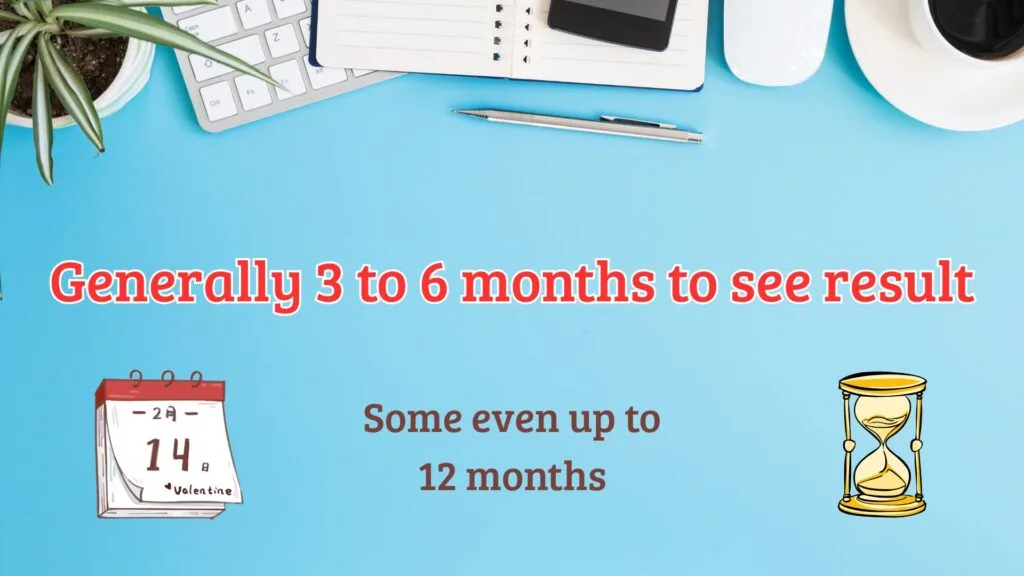
For an existing page that you have optimised or updated, most websites begin to see ranking shifts within two to eight weeks. That is not a guarantee, it is a general industry estimate based on how long Google typically takes to recrawl a page, process the changes, and reassess it against competing results.
For a brand new website or a newly published page, three to six months is a realistic expectation before meaningful organic traffic arrives. New pages have no ranking history, no backlinks, and no established trust with Google. All of which take time to build.
Three factors influence how quickly results appear.
Keyword competition is the most significant variable. A page targeting a low-competition, location-specific keyword can realistically rank within four to eight weeks.
A page going after a broad, high-volume keyword in a competitive market may take six to twelve months regardless of how well it is optimised.
Your domain’s existing authority also plays a role. A website that has been active for several years with a healthy backlink profile will typically see results faster than a brand new domain.
As a rough guide, established sites often see movement two to four weeks sooner than newer ones for the same keyword.
Crawl frequency determines how quickly Google picks up your changes. Smaller sites are crawled less frequently than high-traffic ones.
Publishing consistently and submitting updated URLs through Google Search Console can reduce the wait time between your changes and Google processing them.
>> One practical note: avoid making multiple changes to a page at the same time and then waiting to measure results. Adjust one or two elements at a time so you can identify what is actually driving the improvement.
Common On-Page SEO Mistakes to Avoid
Several of these mistakes are consistent with patterns Yoast has flagged across small business websites and they are worth checking on your own site before moving on to more advanced optimisation work.
Optimising for the wrong keyword
One of the most common errors is targeting keywords that are too broad or too competitive for your site’s current authority. A small business competing for “SEO services” is up against global agencies with years of backlinks and domain history.
A more effective approach is to target specific, lower-competition phrases that reflect exactly what your audience is searching for. These drive less traffic in volume, but far higher relevance.
Ignoring your metadata
Title tags and meta descriptions are the first thing a potential visitor sees in search results. Leaving them unwritten means Google will generate them automatically — usually by pulling random text from your page, which rarely makes a compelling case for clicking.
Write a unique title tag and meta description for every page on your site. Treat them as your first opportunity to earn the click.
Neglecting image optimisation
Large, uncompressed images are one of the most common causes of slow page load times. A page that takes more than three seconds to load loses a significant portion of its visitors before they read a single word.
Compress every image before uploading, use WebP format where possible, and write descriptive alt text for each one.
Weak or missing internal links
Publishing a page and leaving it isolated with no internal links pointing to it or from it means Google has fewer pathways to discover and understand it. It also means visitors have no clear next step after reading.
Every new page should link to at least two or three related pages on your site, and existing pages should be updated to link back to the new one where relevant.
Not considering mobile
Google uses the mobile version of your site to determine rankings, a practice known as mobile-first indexing. A page that looks polished on desktop but is difficult to navigate on a phone will underperform in search, regardless of how well the content is written.
Test every page on a mobile device before publishing. Google’s Mobile-Friendly Test is a free tool that gives you an immediate readout of any issues.
Using duplicate title tags across multiple pages
Each page on your site should have a unique title tag. Duplicate titles confuse Google about which page to rank for a given query and can split ranking potential between two pages that should be distinct.
Audit your title tags regularly, especially if your site has grown over time and pages have been added without a consistent process.
On-Page SEO Tools Worth Using
You do not need a full suite of paid tools to do on-page SEO effectively. The free options below cover most of what a small business website requires, and the paid tools are worth considering only once you are ready to go deeper.
Free tools
Google Search Console is the most important free tool available to any website owner. It shows you which queries your pages are ranking for, how often they appear in search results, and whether Google has encountered any indexing issues on your site.
If you only set up one tool, make it this one.
Google PageSpeed Insights analyses your page load performance and flags specific issues affecting your Core Web Vitals scores. It gives separate results for mobile and desktop, which is useful given Google’s mobile-first indexing approach.
Ahrefs Webmaster Tools (free tier) allows you to audit your site for common on-page issues such as missing title tags, broken internal links, pages without meta descriptions, and more. It also shows which external sites are linking to yours.
Paid tools
Ahrefs and Semrush are the two most widely used SEO platforms among professionals. Both offer keyword research, site auditing, competitor analysis, and rank tracking. For a small business owner managing SEO independently, either tool provides more capability than most will use. Both start at roughly $100–$130 USD per month.
Surfer SEO takes a different approach, it analyses the top-ranking pages for your target keyword and gives you specific recommendations for your content, including suggested word count, heading structure, and keyword usage. It is most useful during the content writing and optimisation phase rather than for technical audits.
For most small business websites, starting with the three free tools and adding a paid option only when you have exhausted what the free tier offers is a reasonable approach.
Should You Do On-Page SEO Yourself or Hire Someone?
There is no universal answer to this question. The right choice depends on your situation, specifically your budget, your time, and how competitive your market is.
When is doing it yourself makes sense?
DIY on-page SEO is a reasonable starting point if your website is small, your target keywords have low to moderate competition, and you are willing to invest time in learning the basics.
The fundamentals covered in this guide: title tags, heading structure, keyword placement, internal linking, and image optimisation, are all tasks you can handle without technical expertise. Free tools like Google Search Console and Google PageSpeed Insights give you enough visibility to make meaningful improvements.
If your budget is limited and your market is not heavily contested, doing it yourself in the early stages is a practical decision.
When hiring a professional makes sense
As your site grows and your target keywords become more competitive, the complexity of on-page SEO increases. At that point, the time required to do it well often outweighs the cost of hiring someone.
Consider bringing in a professional if any of the following apply to your situation:
- You are in a competitive market where the top-ranking pages are well-established businesses with strong domain authority
- You have a large site with many pages that need auditing and updating
- You have been doing SEO yourself for several months without seeing meaningful results
- Your time is better spent running your business than learning a new discipline
A good SEO consultant or agency will not just optimise your existing pages, but they will identify opportunities you have not considered and build a strategy around your specific market and goals.
A practical middle ground
Many small business owners start by handling on-page SEO themselves, then bring in professional help once they have a clearer picture of what is working and where the gaps are. That is a sensible approach, it keeps costs manageable early on while ensuring you are not left behind as competition increases.
How Much Does On-Page SEO Cost in Australia?

SEO pricing in Australia varies widely depending on the scope of work, the size of your website, and the experience level of the provider you engage.
For small to medium-sized businesses, monthly SEO retainers typically range from $1,000 to $5,000 per month. This range covers ongoing work across on-page optimisation, content creation, and reporting. For larger businesses or enterprise-level campaigns, investment often exceeds $10,000 per month.
One-off on-page SEO audits and optimisation projects are also available for businesses that prefer a fixed-scope engagement rather than an ongoing retainer. These typically range from $500 to $2,500 depending on the size of the site and the depth of the audit.
What affects the price
Several factors influence where a quote lands within those ranges.
Site size is one of the most straightforward variables. A ten-page service website requires significantly less work than a hundred-page e-commerce site with product descriptions, category pages, and blog content all needing attention.
Market competitiveness also plays a role. Ranking in a competitive industry like legal services, finance, or real estate, for example, will require more sustained effort than ranking in a less contested niche. Providers will price accordingly.
The scope of deliverables matters too. Some agencies include content writing, technical audits, and monthly reporting in their retainer. Others charge separately for each component. Always clarify what is included before signing an agreement.
What to watch out for
Be cautious of providers offering SEO services at unusually low prices under $300 to $500 per month as a standard rate. At that price point, the volume and quality of work required to produce real results is difficult to sustain. Low-cost providers often rely on automated tools and templated reports rather than genuine strategic work.
The exception worth noting is introductory promotions. Some providers — including newer agencies building their client base — occasionally offer discounted rates for the first one to three months. If you come across an offer like this from a provider with transparent deliverables and verifiable work samples, it can represent genuine value rather than a warning sign.
The distinction is straightforward: a promotion has a clear timeframe and a stated regular rate after the promotional period ends. A suspiciously low permanent price with no explanation is a different situation entirely.
Ask any provider you are considering for examples of results they have achieved for businesses similar to yours, and request a clear breakdown of what the monthly retainer covers on promotional or otherwise.
Conclusion: Build a Stronger Website, One Page at a Time
On-page SEO is not a one-time task. It is an ongoing process of making your pages clearer, more useful, and better aligned with what your audience is actually searching for.
The fundamentals covered in this guide: title tags, heading structure, keyword placement, internal linking, image optimisation, and content quality, are the building blocks of a website that search engines trust and users find valuable. Get these right, and everything else you do in SEO becomes more effective.
Start with the pages that matter most to your business. Optimise your service pages and your highest-traffic blog posts first. Then work through the rest of your site systematically, using Google Search Console to identify where the biggest opportunities lie.
If you would like help auditing your website and building an on-page SEO strategy tailored to your market, get in touch with Rhasko Digital for a free website review.